---
title: Hub-Drive Error Code 06 - Battery
description: "Resolve Error Code 6 on QuietKat e-bikes: Fix Battery under-voltage issues with our comprehensive troubleshooting guide."
---
[Skip to content](https://kb.quietkat.com/en/support/hub-drive-error-code-06#main-content)
English
Show submenu for translations
[Customer portal](https://kb.quietkat.com/tickets-view?hsLang=en)
![ALL\_WHITE\_LOGO.png\]](https://kb.quietkat.com/hs-fs/hubfs/ALL_WHITE_LOGO.png?height=31&name=ALL_WHITE_LOGO.png)
- eBikes
- Accessories
- 0% Finanancing
Open main navigation
Close main navigation
- eBikes
- Accessories
- 0% Finanancing
- English
Show submenu for translations
- [Customer portal](https://kb.quietkat.com/tickets-view)
- GO TO QUIETKAT.COM
GO TO QUIETKAT.COM
QUIETKAT SUPPORT CENTER
- There are no suggestions because the search field is empty.
1. [SUPPORT CENTER](https://kb.quietkat.com/en/support?hsLang=en)
2. [TROUBLESHOOTING & MAINTENANCE](https://kb.quietkat.com/en/support/troubleshooting-maintenance?hsLang=en)
3. [HUB DRIVE ERROR CODES](https://kb.quietkat.com/en/support/troubleshooting-maintenance?hsLang=en#hub-drive-error-codes)
# Hub-Drive Error Code 06 - Battery
## Battery Under Voltage Error
Error Code 6 on your QuietKat electric bike indicates a problem with the battery voltage. This error typically occurs when the battery voltage drops below the safe operating range, potentially affecting the bike's performance and safety.
### **Troubleshooting Steps for Error Code 6**
**1. Safety First:**
- Ensure your bike is parked safely and turned off before attempting any troubleshooting.
**2. Check Battery Connections:**
- Inspect the battery connections for any loose or corroded terminals. If you find any, disconnect the battery and clean the terminals before reconnecting it securely.
**3. Charge the Battery:**
- If your battery is not fully charged, plug it into the charger and allow it to charge completely. A low battery voltage can trigger this error.
**4. Battery Voltage Test:**
- Use a voltmeter to measure the battery's voltage. Typically, a healthy 48V QuietKat battery should have a voltage reading of 54.6V at full charge.
- If the voltage is consistently below 54.6V after a full charge, it may indicate a battery issue. [Contact QuietKat's customer support](https://kb.quietkat.com/en/support/contact?hsLang=en) for guidance on battery replacement or repair.
**5. Inspect Battery Health:**
- If the battery voltage is within the correct range but still triggering the error, the battery itself might be aging or damaged.
- Consult with a professional technician to evaluate the battery's health and performance.
**6. Avoid Overloading:**
- Ensure you are not overloading the bike with additional accessories or weight that exceeds the recommended capacity. Overloading can strain the battery and lead to voltage issues.
**7. Battery Storage and Care:**
- Follow the manufacturer's recommendations for storing and maintaining your e-bike battery. You can find the best battery practices [here](https://kb.quietkat.com/en/support/battery-safety-charging-and-storage?hsLang=en). Extreme temperatures and improper storage can affect its voltage and overall performance.
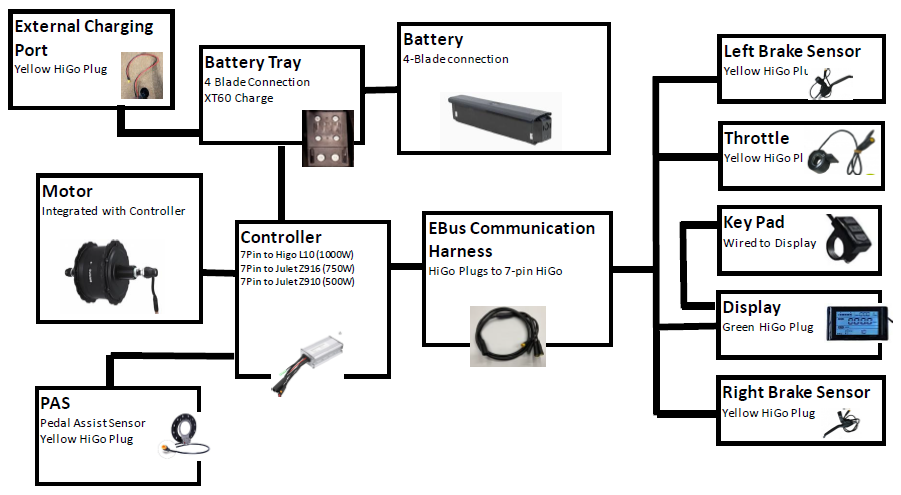
Electric Components Diagram for Hub-Drive Bikes:
- [ORDERING INFO](https://kb.quietkat.com/en/support/ordering-info?hsLang=en#main-content)
- [PRE PURCHASE INFO](https://kb.quietkat.com/en/support/ordering-info?hsLang=en#pre-purchase-info)
- [CHOOSING YOUR QUIETKAT](https://kb.quietkat.com/en/support/ordering-info?hsLang=en#choosing-your-quietkat)
- [THE BASICS OF EBIKES](https://kb.quietkat.com/en/support/the-basics-of-ebikes?hsLang=en#main-content)
- [THE BASICS](https://kb.quietkat.com/en/support/the-basics-of-ebikes?hsLang=en#the-basics)
- [ELECTRICAL INFORMATION](https://kb.quietkat.com/en/support/the-basics-of-ebikes?hsLang=en#electrical-information)
- [MECHANICAL INFORMATION](https://kb.quietkat.com/en/support/the-basics-of-ebikes?hsLang=en#mechanical-information)
- [QUIETKAT OWNER'S TOOLBOX](https://kb.quietkat.com/en/support/quietkat-owners-toolbox?hsLang=en#main-content)
- [GENERAL INFORMATION](https://kb.quietkat.com/en/support/quietkat-owners-toolbox?hsLang=en#general-information)
- [BIKE ASSEMBLY AND INFORMATION](https://kb.quietkat.com/en/support/quietkat-owners-toolbox?hsLang=en#bike-assembly-and-information)
- [ACCESSORY ASSEMBLY AND INFORMATION](https://kb.quietkat.com/en/support/quietkat-owners-toolbox?hsLang=en#accessory-assembly-and-information)
- [TROUBLESHOOTING & MAINTENANCE](https://kb.quietkat.com/en/support/troubleshooting-maintenance?hsLang=en#main-content)
- [POWER LOSS](https://kb.quietkat.com/en/support/troubleshooting-maintenance?hsLang=en#power-loss)
- [HUB DRIVE ERROR CODES](https://kb.quietkat.com/en/support/troubleshooting-maintenance?hsLang=en#hub-drive-error-codes)
- [MID DRIVE ERROR CODES](https://kb.quietkat.com/en/support/troubleshooting-maintenance?hsLang=en#mid-drive-error-codes)
- [MAINTENANCE TIPS](https://kb.quietkat.com/en/support/troubleshooting-maintenance?hsLang=en#maintenance-tips)
- [OPEN QUIETKAT SUPPORT TICKET](https://kb.quietkat.com/en/support/open-quietkat-support-ticket?hsLang=en#main-content)
- [Consumer Forms](https://kb.quietkat.com/en/support/open-quietkat-support-ticket?hsLang=en#consumer-forms)
- [Retail Partner Forms](https://kb.quietkat.com/en/support/open-quietkat-support-ticket?hsLang=en#retail-partner-forms)
- [Government](https://kb.quietkat.com/en/support/government?hsLang=en)
- eBikes
- Accessories
- 0% Finanancing
[](https://quietkat.com/)
QUIETKAT.COM SUPPORT CENTER
Copyright © 2026, QuietKat