---
title: Mid-Drive Error Code 21 - Speed Sensor
description: "Learn how to troubleshoot and fix Error 21: Speed Sensor Error on your QuietKat Bafang mid-drive electric bike. Get back to smooth rides with our comprehensive guide."
---
[Skip to content](https://kb.quietkat.com/en/support/mid-drive-error-code-21#main-content)
English
Show submenu for translations
[Customer portal](https://kb.quietkat.com/tickets-view?hsLang=en)
![ALL\_WHITE\_LOGO.png\]](https://kb.quietkat.com/hs-fs/hubfs/ALL_WHITE_LOGO.png?height=31&name=ALL_WHITE_LOGO.png)
- eBikes
- Accessories
- 0% Finanancing
Open main navigation
Close main navigation
- eBikes
- Accessories
- 0% Finanancing
- English
Show submenu for translations
- [Customer portal](https://kb.quietkat.com/tickets-view)
- GO TO QUIETKAT.COM
GO TO QUIETKAT.COM
QUIETKAT SUPPORT CENTER
- There are no suggestions because the search field is empty.
1. [SUPPORT CENTER](https://kb.quietkat.com/en/support?hsLang=en)
2. [TROUBLESHOOTING & MAINTENANCE](https://kb.quietkat.com/en/support/troubleshooting-maintenance?hsLang=en)
3. [MID DRIVE ERROR CODES](https://kb.quietkat.com/en/support/troubleshooting-maintenance?hsLang=en#mid-drive-error-codes)
# Mid-Drive Error Code 21 - Speed Sensor
## Speed Sensor Error
Error 21 typically indicates a problem with the speed sensor system on your Bafang mid-drive electric bike. The speed sensor is crucial for determining the bike's speed and providing the appropriate level of electric assistance. When this error occurs, it can lead to inaccurate speed readings, inconsistent motor support, or even a complete loss of motor assistance.
### **Troubleshooting Steps**
1. **Safety First:** Ensure the electric bike is turned off and place the bike on a stable and level surface.
2. **Visual Inspection:** Carefully inspect the speed sensor and its wiring for any visible damage, loose connections, or signs of wear. Ensure the sensor is properly aligned and free from obstructions.
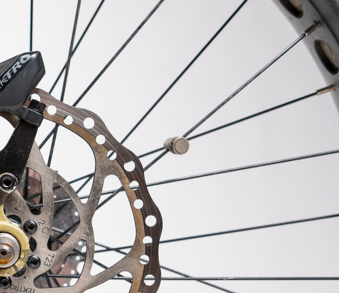
3. **Magnet Alignment:** Verify that the magnet on the wheel spoke is properly aligned with the speed sensor. A misaligned magnet can trigger Error 21. Adjust it if necessary.
4. **Test the Bike:** After each step, turn on the bike and take it for a test ride. Pay attention to how the bike responds to throttle input and monitor the speed readings on the display.
5. **Check Magnet Condition:** Examine the condition of the magnet on the wheel spoke. If it's damaged or worn, replace it with a new one to ensure accurate speed readings.
6. **Controller Reset:** Some speed sensor errors can be resolved by resetting the controller. Turn off the bike, disconnect the battery, wait a few minutes, reconnect the battery, and turn the bike back on. Test the speed sensor again.
7. **Professional Assistance:** If you're unable to resolve the issue on your own or if the problem persists, contact a certified electric bike technician or [QuietKat Support](https://kb.quietkat.com/en/support/contact-menu?hsLang=en) for advanced diagnostics and repairs. If you are still within your warranty period, or have the Extend warranty, this will be covered. If you are outside of your warranty period, we will send you a quote for the replacement part(s).
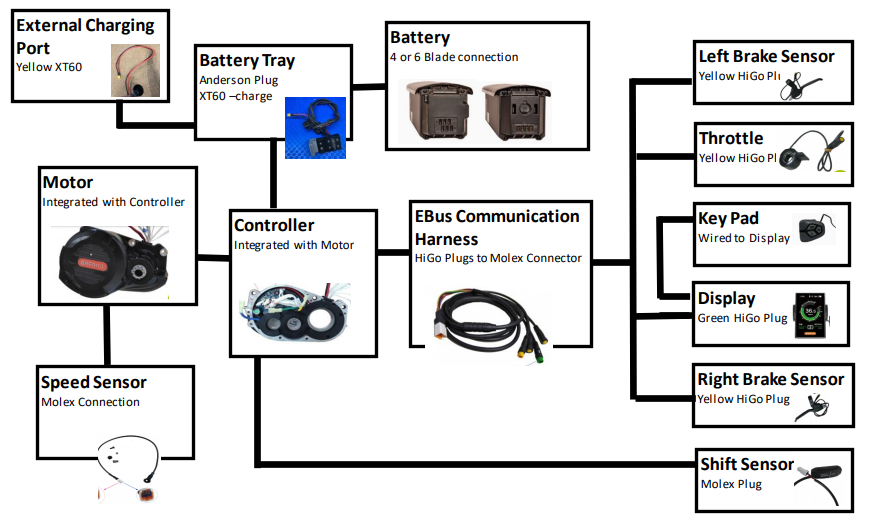
Electrical Components Diagram for Mid-Drive Bikes:
- [ORDERING INFO](https://kb.quietkat.com/en/support/ordering-info?hsLang=en#main-content)
- [PRE PURCHASE INFO](https://kb.quietkat.com/en/support/ordering-info?hsLang=en#pre-purchase-info)
- [CHOOSING YOUR QUIETKAT](https://kb.quietkat.com/en/support/ordering-info?hsLang=en#choosing-your-quietkat)
- [THE BASICS OF EBIKES](https://kb.quietkat.com/en/support/the-basics-of-ebikes?hsLang=en#main-content)
- [THE BASICS](https://kb.quietkat.com/en/support/the-basics-of-ebikes?hsLang=en#the-basics)
- [ELECTRICAL INFORMATION](https://kb.quietkat.com/en/support/the-basics-of-ebikes?hsLang=en#electrical-information)
- [MECHANICAL INFORMATION](https://kb.quietkat.com/en/support/the-basics-of-ebikes?hsLang=en#mechanical-information)
- [QUIETKAT OWNER'S TOOLBOX](https://kb.quietkat.com/en/support/quietkat-owners-toolbox?hsLang=en#main-content)
- [GENERAL INFORMATION](https://kb.quietkat.com/en/support/quietkat-owners-toolbox?hsLang=en#general-information)
- [BIKE ASSEMBLY AND INFORMATION](https://kb.quietkat.com/en/support/quietkat-owners-toolbox?hsLang=en#bike-assembly-and-information)
- [ACCESSORY ASSEMBLY AND INFORMATION](https://kb.quietkat.com/en/support/quietkat-owners-toolbox?hsLang=en#accessory-assembly-and-information)
- [TROUBLESHOOTING & MAINTENANCE](https://kb.quietkat.com/en/support/troubleshooting-maintenance?hsLang=en#main-content)
- [POWER LOSS](https://kb.quietkat.com/en/support/troubleshooting-maintenance?hsLang=en#power-loss)
- [HUB DRIVE ERROR CODES](https://kb.quietkat.com/en/support/troubleshooting-maintenance?hsLang=en#hub-drive-error-codes)
- [MID DRIVE ERROR CODES](https://kb.quietkat.com/en/support/troubleshooting-maintenance?hsLang=en#mid-drive-error-codes)
- [MAINTENANCE TIPS](https://kb.quietkat.com/en/support/troubleshooting-maintenance?hsLang=en#maintenance-tips)
- [OPEN QUIETKAT SUPPORT TICKET](https://kb.quietkat.com/en/support/open-quietkat-support-ticket?hsLang=en#main-content)
- [Consumer Forms](https://kb.quietkat.com/en/support/open-quietkat-support-ticket?hsLang=en#consumer-forms)
- [Retail Partner Forms](https://kb.quietkat.com/en/support/open-quietkat-support-ticket?hsLang=en#retail-partner-forms)
- [Government](https://kb.quietkat.com/en/support/government?hsLang=en)
- eBikes
- Accessories
- 0% Finanancing
[](https://quietkat.com/)
QUIETKAT.COM SUPPORT CENTER
Copyright © 2026, QuietKat