---
title: Mid-Drive Error Code 30 - Communication Error
description: "Troubleshoot and fix Error 30: Communication Error on your QuietKat Bafang mid-drive electric bike with our comprehensive guide. Get back on the trail without communication hiccups."
---
[Skip to content](https://kb.quietkat.com/en/support/mid-drive-error-code-30#main-content)
English
Show submenu for translations
[Customer portal](https://kb.quietkat.com/tickets-view?hsLang=en)
![ALL\_WHITE\_LOGO.png\]](https://kb.quietkat.com/hs-fs/hubfs/ALL_WHITE_LOGO.png?height=31&name=ALL_WHITE_LOGO.png)
- eBikes
- Accessories
- 0% Finanancing
Open main navigation
Close main navigation
- eBikes
- Accessories
- 0% Finanancing
- English
Show submenu for translations
- [Customer portal](https://kb.quietkat.com/tickets-view)
- GO TO QUIETKAT.COM
GO TO QUIETKAT.COM
QUIETKAT SUPPORT CENTER
- There are no suggestions because the search field is empty.
1. [SUPPORT CENTER](https://kb.quietkat.com/en/support?hsLang=en)
2. [TROUBLESHOOTING & MAINTENANCE](https://kb.quietkat.com/en/support/troubleshooting-maintenance?hsLang=en)
3. [MID DRIVE ERROR CODES](https://kb.quietkat.com/en/support/troubleshooting-maintenance?hsLang=en#mid-drive-error-codes)
# Mid-Drive Error Code 30 - Communication Error
## Communication Error
Error 30 typically indicates a problem with the communication between the various components of your Bafang mid-drive electric bike, such as the motor, controller, and/or display. This error can result in a loss of functionality and performance issues, making it important to address promptly.
**Troubleshooting Steps**
1. **Safety First:** Begin by ensuring the electric bike is turned off and place the bike on a stable surface in a safe location.
2. **Visual Inspection:**
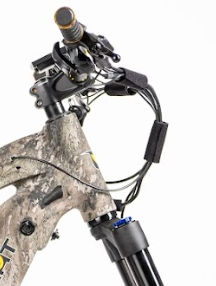
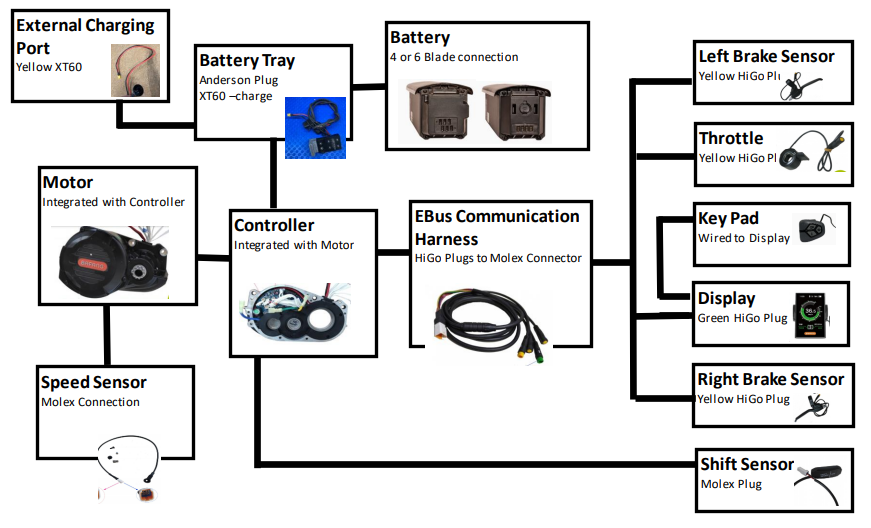
1. Carefully inspect all wiring connections for any visible damage, loose connections, or signs of wear. Ensure that the wiring harnesses are securely fastened. Pay close attention to the connections with the Communication Harness that runs between your controller and electronic components on your handlebars, especially your display.
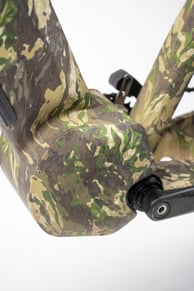
2. The Communication Harness will run down your frame to the controller, which will require you to remove the non-drive side cover plate to inspect this side of the wiring. Look for loose connections, damaged wires, or any visible signs of wear. Ensure all connections are securely fastened. Report physical damage to QuietKat immediately, but DO NOT remove the motor from the casing without consulting with [QuietKat customer service](https://kb.quietkat.com/en/support/contact-menu?hsLang=en) first; this could void your warranty.
3. **Battery Check:** Verify that the battery is fully charged. Low battery voltage can sometimes lead to communication errors. Charge the battery if necessary. You can check the battery voltage by using a voltmeter. A healthy battery should read 54.6V at full charge.
4. **Controller Reset:** Resetting the controller can resolve some communication errors. Turn off the bike, disconnect the battery, wait for a few minutes, reconnect the battery, and turn the bike back on. Test the bike to see if the error persists.
5. **Professional Assistance:** If you are unable to resolve the issue on your own or if the problem persists, contact [QuietKat Support](https://kb.quietkat.com/en/support/contact?hsLang=en) to report any of your findings with wiring inspections. The more detail you can provide on the behaviors of your bike, the better.
Electrical Components Diagram for Mid-Drive Bikes:
- [ORDERING INFO](https://kb.quietkat.com/en/support/ordering-info?hsLang=en#main-content)
- [PRE PURCHASE INFO](https://kb.quietkat.com/en/support/ordering-info?hsLang=en#pre-purchase-info)
- [CHOOSING YOUR QUIETKAT](https://kb.quietkat.com/en/support/ordering-info?hsLang=en#choosing-your-quietkat)
- [THE BASICS OF EBIKES](https://kb.quietkat.com/en/support/the-basics-of-ebikes?hsLang=en#main-content)
- [THE BASICS](https://kb.quietkat.com/en/support/the-basics-of-ebikes?hsLang=en#the-basics)
- [ELECTRICAL INFORMATION](https://kb.quietkat.com/en/support/the-basics-of-ebikes?hsLang=en#electrical-information)
- [MECHANICAL INFORMATION](https://kb.quietkat.com/en/support/the-basics-of-ebikes?hsLang=en#mechanical-information)
- [QUIETKAT OWNER'S TOOLBOX](https://kb.quietkat.com/en/support/quietkat-owners-toolbox?hsLang=en#main-content)
- [GENERAL INFORMATION](https://kb.quietkat.com/en/support/quietkat-owners-toolbox?hsLang=en#general-information)
- [BIKE ASSEMBLY AND INFORMATION](https://kb.quietkat.com/en/support/quietkat-owners-toolbox?hsLang=en#bike-assembly-and-information)
- [ACCESSORY ASSEMBLY AND INFORMATION](https://kb.quietkat.com/en/support/quietkat-owners-toolbox?hsLang=en#accessory-assembly-and-information)
- [TROUBLESHOOTING & MAINTENANCE](https://kb.quietkat.com/en/support/troubleshooting-maintenance?hsLang=en#main-content)
- [POWER LOSS](https://kb.quietkat.com/en/support/troubleshooting-maintenance?hsLang=en#power-loss)
- [HUB DRIVE ERROR CODES](https://kb.quietkat.com/en/support/troubleshooting-maintenance?hsLang=en#hub-drive-error-codes)
- [MID DRIVE ERROR CODES](https://kb.quietkat.com/en/support/troubleshooting-maintenance?hsLang=en#mid-drive-error-codes)
- [MAINTENANCE TIPS](https://kb.quietkat.com/en/support/troubleshooting-maintenance?hsLang=en#maintenance-tips)
- [OPEN QUIETKAT SUPPORT TICKET](https://kb.quietkat.com/en/support/open-quietkat-support-ticket?hsLang=en#main-content)
- [Consumer Forms](https://kb.quietkat.com/en/support/open-quietkat-support-ticket?hsLang=en#consumer-forms)
- [Retail Partner Forms](https://kb.quietkat.com/en/support/open-quietkat-support-ticket?hsLang=en#retail-partner-forms)
- [Government](https://kb.quietkat.com/en/support/government?hsLang=en)
- eBikes
- Accessories
- 0% Finanancing
[](https://quietkat.com/)
QUIETKAT.COM SUPPORT CENTER
Copyright © 2026, QuietKat